
The DBS Restore Backup utility (DBSRestoreBackup.exe) is a command-line utility used to restore a database backup file from a DBS-based service. This utility can be used to restore the database backup and apply any committed transactions between the time of the automatic backup and the time of database failure. The utility can also be used to restore a database to the state it was in at the time of the last successful backup.
Several optional parameters are provided to specify where to restore the backup to, where a backup is located, and the path to the service configuration file (to read the backup path). If no parameters are provided, then the current directory is where the restored database will be placed, using the configuration file in the current directory, and the backup path specified in the file. You are able to explicitly define each of the three pieces of information used to restore a backup: restore_from, restore_to, and config file path.
Be aware that this utility restores data from the data files only; it does not restore service files (configuration, executable, data dictionary, and metadata files).
Note: See Hard Recovery for more information about how hard recovery works in ESE-based datastores.
If you are restoring the database to the service’s data directory, the service must be stopped when running the utility. However, if you are restoring the database to a different location using the /RESTORE_TO: parameter, the service can be running. See /RESTORE_TO: Parameter below.
A database service backup directory is comprised of the root directory and a child directory named databackup. The root directory is the location to which the service definition files are backed up. These files include the configuration file (.cfg), Data Dictionary File (.ddl), and any metadata files. The databackup directory has a subdirectory named new. This directory contains the backed-up data files which include the data, index, temporary storage, and any transaction (tx) log files that have been backed-up as the result of an incremental backup. The new directory is created as part of the atomic backup process.
A DBS-based service backup file is automatically flagged with a bit set in the file header. This flag must exist in the backup file for the DBS Restore Backup utility to recognize and restore the file. The utility will fail if the flag is missing from the backup file. For example, if a service has been stopped and the database is copied to another location, a DBSRestoreBackup for the copied database file would fail, because the file has not been flagged as a backup file.
DBSRestoreBackup [/RESTORE_TO:<directory>] [/RESTORE_FROM:<directory>] [/SNAPSHOT [/PURGE_TXLOGS]] [CFG_FILE]
Depending upon the location where the command is being run, the command line may need to include the path to the utility and/or to the service configuration file.
If the utility is run from the service’s data directory, you must include the path to the utility.
|
C:\CygNet\Services\ELS>C:\CygNet\Utilities\DBSRestoreBackup |
If the utility is not run from the service’s data directory, you must include the CFG_FILE parameter to specify the location of the service configuration file. This is because the location of the backup directory and the txlogs directory is read from the service configuration file.
|
C:\CygNet\Utilities>DBSRestoreBackup C:\CygNet\Services\ELS\Els.cfg |
If the utility has been copied to the service’s data directory, neither path is required.
|
C:\CygNet\Services\ELS>DBSRestoreBackup |
| Parameter | Definition |
|---|---|
|
/RESTORE_TO:<directory> |
An optional parameter that tells the utility where to restore the backup. See /RESTORE_TO: Parameter below for more information. Notes: There is no space between the colon after "/RESTORE_TO" and the directory name. If the name of the restore directory contains a space, the path must be enclosed in quotation marks. The default is the same directory as CFG_FILE. |
|
/RESTORE_FROM:<directory> |
An optional parameter that tells the utility where the backup is located. Notes: There is no space between the colon after "/RESTORE_FROM" and the directory name. If the name of the restore directory contains a space, the path must be enclosed in quotation marks. The default is the same directory as CFG_FILE. |
|
/SNAPSHOT |
An optional parameter that tells the utility to restore the database to a point-in-time rather than the complete data set. Restore backup to the state it was at the last successful backup. See /SNAPSHOT Parameter below for more information. Notes: If omitted the utility will restore the complete data set. The default is to include changes since the last backup. |
|
/PURGE_TXLOGS |
An optional parameter that tells the utility to delete the service's txlogs directory after a successful backup. See /PURGE_TXLOGS Parameter below for more information. Notes: This parameter can only be used in conjunction with the /SNAPSHOT parameter. If the txlogs directory is removed, subsequent non-/SNAPSHOT restores from the same backup source will fail. |
|
CFG_FILE |
An optional parameter to specify the path and file name of the service configuration file to read. The default value is the configuration file in the current directory. |
DBSRestoreBackup (without the /SNAPSHOT parameter) provides a method to restore the complete data set. The complete data set is comprised of the data in the backup files, as well as the data stored in transaction log files, which are located in the service’s txlogs directory (meaning that data generated after the last backup will be recovered as part of the restore).
Example 1
In this example, the utility writes the data from the ELS backup directory to restored files in the ELS data directory, then writes the data from the transaction log files that reside in the ELS’s txlogs directory to the restored files.
Since the command is being run from the ELS’s data directory the path to the utility is included in the command line.
|
C:\CygNet\Services\ELS>C:\CygNet\Utilities\DBSRestoreBackup |

Example 2
This example is the same as Example 1 except that the utility is being run from the Utilities directory. As such, it includes CFG_FILE parameter to specify the location of the service configuration file.
|
C:\CygNet\Utilities>DBSRestoreBackup C:\CygNet\Services\ELS\Els.cfg |
This optional parameter provides a method to restore the backup to a location other than the service’s data directory. Processing is the same as using DBSRestoreBackup; that is, it results in the restoration of the complete data set.

Note that there is no space between the /RESTORE_TO: parameter and the path it specifies. If the path contains spaces, it must be enclosed in quotation marks. The utility will create the destination directory if it does not exist.
Example 3
In this example, the utility writes the data from the ELS backup directory to restored files in the ELS_Restored directory, then writes the data from transaction log files that reside the ELS’s txlogs directory to the restored files.
|
C:\CygNet\Services\ELS>C:\CygNet\Utilities\DBSRestoreBackup /RESTORE_TO:c:\els_restored |

Example 4
In this example the name of the restore directory includes a space so the path is enclosed in quotation marks.
|
C:\CygNet\Utilities>DBSRestoreBackup /RESTORE_TO:"C:\Restored ELS" C:\CygNet\Services\ELS\Els.cfg |

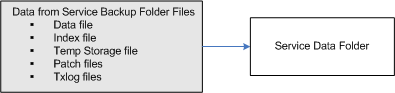
This optional parameter provides a method to restore the database to a point-in-time rather than the complete data set. The point-in-time is the last full backup and any transaction log files that have been backed-up as the result of an incremental backup. The /SNAPSHOT restore does not include the data contained in the transaction log files stored in the service’s txlogs directory.
Example 5
In this example, the utility writes the data from the ELS backup directory to restored files in the ELS data directory. The data from the transaction log files in the service’s txlogs directory is not included.
|
C:\CygNet\Services\ELS>C:\CygNet\Utilities\DBSRestoreBackup /SNAPSHOT |

This optional parameter can be used only in conjunction with the /SNAPSHOT parameter. This parameter provides a method to delete the files stored in the service’s txlogs directory. Use this option if you want to ensure that the database is restored to a point-in-time and that no updates since the backup will be applied. If you do not purge the transaction log files, the data from the log files will be written to the database as part of its normal processing.

Be aware that if the /PURGE_TXLOGS parameter is used, then any subsequent backups that expect the files in the txlogs directory will fail. This is because when the purge is complete, there will be no transaction log files in the service txlogs directory. The service will create new transaction log files when it restarts, starting the log file numbering at 1.
Example 6
In this example, the utility writes the data from the ELS backup directory to restored files in the ELS data directory. Since the command is being run from the ELS’s data directory the path to the utility is included in the command line.
|
C:\CygNet\Services\ELS>C:\CygNet\Utilities\DBSRestoreBackup /SNAPSHOT /PURGE_TXLOGS |


|
|
|

